
 MeshLine
What is MeshLine for marketing, integrations, and revenue intelligence?
A practical introduction to MeshLine as an operating layer across content execution, system connections, and revenue workflows.
What is MeshLine for marketing, integrations, and revenue intelligence?
What is MeshLine for marketing, integrations, and revenue intelligence
What Meshline is becomes easier to explain when teams describe it as the operating layer that connects marketing, integrations, and revenue intelligence across one visible execution path.
If you are researching MeshLine, you are probably trying to solve a very practical problem: they have plenty of tools but no single execution layer that keeps the workflow moving when timing, routing, and review all matter. This article is written for operators, founders, and revenue teams trying to understand what MeshLine actually replaces, and it is designed to answer the questions a real buyer asks before rollout. What does setup look like? What does usage feel like after launch? How quickly can a focused project go live? And how does the system stay useful after the first workflow is already running?
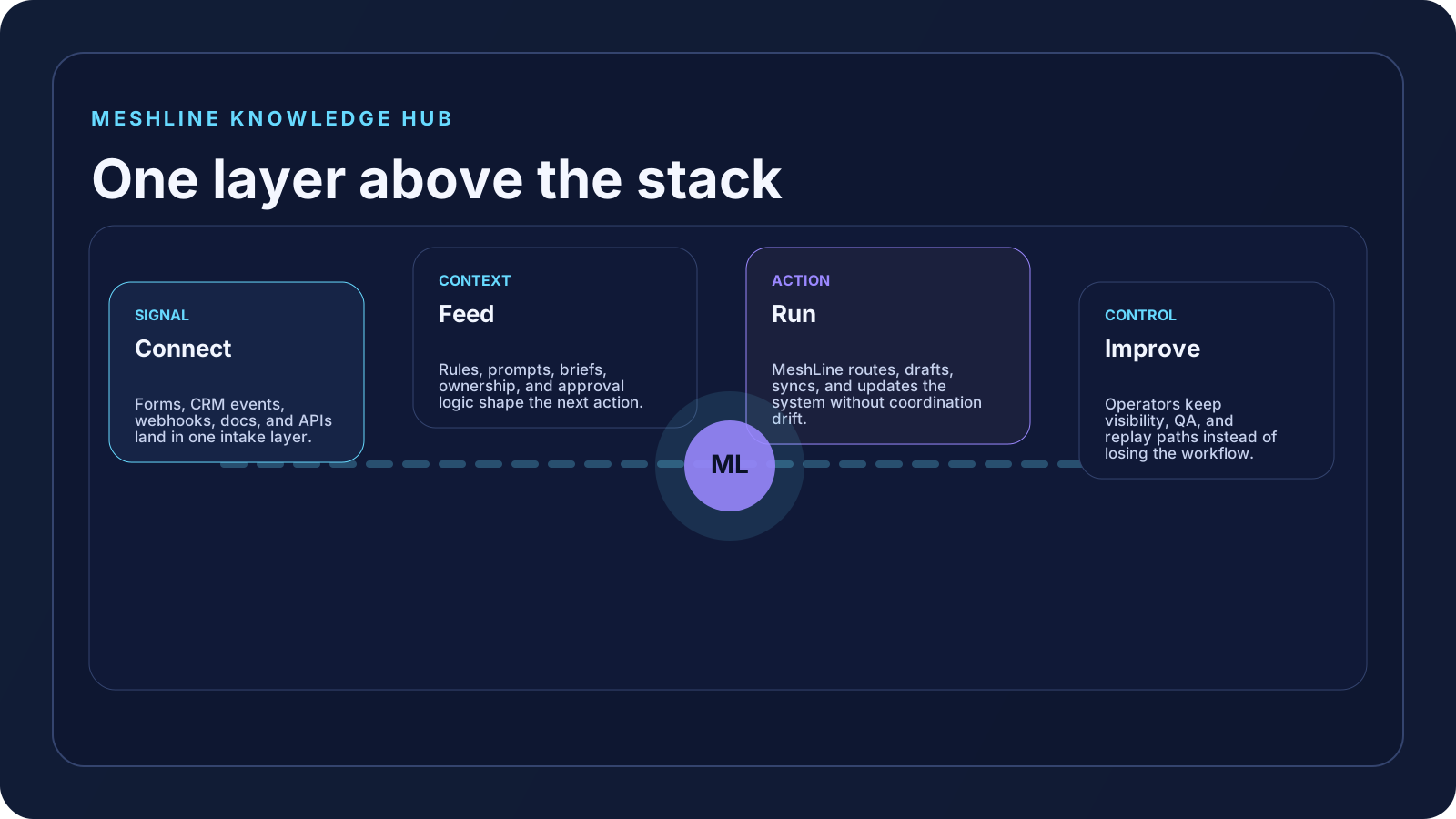
MeshLine works best when it is understood as an operating layer, not as another workflow builder. The product sits above the tools you already use and turns trigger, process, and outcome into one visible system. In this case the best mental model is connect, feed, and run. That lens matters because the strongest buyers are not shopping for another dashboard. They are looking for a faster, clearer way to move work from signal to outcome without losing human control.
For smaller, focused scopes, MeshLine can often go live inside two weeks. For broader enterprise implementations with more stakeholders, more systems, and more exception planning, the typical target is under 60 days. The right way to think about the timeline is not "How much can we connect?" It is "Which workflow creates the clearest business win once it is live?"
What the user experience is actually like when this works
The user experience is deliberately calmer than the typical automation stack. You are not asked to build a maze of zaps, remember which spreadsheet owns the truth, or guess why a workflow stalled. You connect the systems involved, define what information MeshLine should trust, and then keep the actual operating decisions visible in one place.
When teams describe MeshLine well, they usually say it feels like the business finally has a control room. Marketing stops living in briefs and chat threads. Integrations stop feeling like hidden glue. Revenue follow-up stops depending on who happened to check the CRM first.
That is the lens that matters when you evaluate MeshLine. A real operator does not care whether the workflow looks clever in a diagram. They care whether the system removes the hidden handoff work, keeps the next action obvious, and gives the team enough visibility to trust the result.
The practical rollout model for connect, feed, and run
1. Connect the systems that create or receive the signal
The first step is not to integrate everything. It is to identify where the trigger enters the business and where the business needs the outcome to land. In marketing, that might mean a topic source, a review queue, a CMS, and a performance signal. In integrations, it might mean webhooks, a CRM, a spreadsheet, and a destination app. In revenue intel, it might mean the inbound lead source, the scoring rules, the owner queue, and the CRM update path. MeshLine starts by connecting that path clearly.
That matters because teams usually lose momentum before the workflow even becomes interesting. The source event lands in one place, context lives somewhere else, and the person who has to decide what happens next is left stitching together the state manually. MeshLine removes that coordination step and makes the system legible.
2. Feed MeshLine the context a good operator would actually need
Most operating problems are not caused by missing buttons. They are caused by missing context. A workflow that knows an event happened but does not know who owns it, what good looks like, which exceptions matter, or what brand rules apply will still create more manual work. That is why the feed layer is so important. MeshLine needs the brief, the intent model, the routing rule, the approval step, the exclusions, and the business logic that a real operator would ask for.
This is where the difference between software theater and useful execution becomes obvious. In MeshLine, the system does not just fire actions. It uses the supplied context to make the next step reviewable and practical. That is why the same platform can support a content workflow, an integration handoff, and a revenue routing process without feeling like three unrelated tools.
3. Run one visible workflow before expanding
The fastest teams do not buy MeshLine and immediately attempt a platform-wide migration. They choose one bottleneck that is expensive, repetitive, and clear enough to measure. Then they run that first workflow until the handoffs are stable. That is how a focused rollout can go live inside two weeks for smaller scopes: one engine, one clear outcome, one owner, and one visible system.
Once that first workflow is stable, the rest of the expansion becomes easier because the operating pattern is already established. You can add more triggers, more destinations, and more reporting without redefining the category every time. The buyer experience improves because the team is no longer asking whether automation exists. They are asking how much of the operating layer they want MeshLine to own next.
A realistic example of how this rollout feels in practice
Imagine a team using MeshLine in the exact context this article covers. In week one, they identify the trigger, the context source, the review surface, and the business outcome. In week two, they feed the system what a capable operator would normally carry in their head: structure, thresholds, rules, ownership, and exceptions. Once the workflow runs, the biggest change is not that work suddenly becomes magical. It is that the team no longer has to coordinate the basics manually.
That is usually the moment the category starts to make sense. The buyer realizes MeshLine is not competing with every app in the stack. It is giving the stack an execution layer. People stop asking who is waiting on what, whether the latest brief is the right one, or why the handoff failed silently. They can see the state, the next action, and the result.
This is also why MeshLine content should explain the lived workflow experience, not just the system diagram. Readers want to know what they will feel after launch: fewer handoff delays, fewer invisible dependencies, fewer spreadsheet patches, fewer reviews that start from scratch, and faster movement from signal to outcome. That is the conversion story because it matches the buyer's real day-to-day pain.
What this looks like once it is working
What buyers usually need here is not generic possibility. They need to see concrete operating situations where MeshLine changes the user experience, shortens time to value, and removes hidden coordination work.
- A content team wants one operating layer for strategy, drafting, approvals, and publishing instead of relying on scattered briefs and ad hoc edits.
- An ops team needs webhook capture, field mapping, and visible retries without burying the workflow inside brittle scripts.
- A revenue team wants inbound qualification, routing, and CRM updates to happen while ownership and logs stay visible.
- A founder wants a consulting-plus-software model that gets a workflow live quickly without creating a permanent dependency on custom code.
Questions real buyers ask in this situation
Is MeshLine an automation tool or a managed operating layer?
The practical answer is both, but it should be understood as an operating layer first. The automation is there because execution has to happen. The value comes from replacing coordination, keeping the workflow visible, and making the system behave like infrastructure rather than like a pile of disconnected tasks.
Do we need a developer before we can use MeshLine?
Not for a focused rollout. Smaller projects can usually launch with a business-led scope, clear rules, and the right system access. Enterprise programs often involve more review, more systems, and more edge cases, but the point is still to shorten the path from design to live workflow instead of turning every improvement into a custom build.
What module do most buyers start with?
Most buyers start where manual coordination is most expensive. That often means marketing content operations if publishing is inconsistent, integrations if handoffs are brittle, or revenue intel if leads are arriving faster than the team can qualify and route them.
How does MeshLine reduce go-live risk?
It scopes the first workflow tightly, keeps ownership visible, and makes the decision logic inspectable. Instead of betting on a giant transformation, teams prove one system, measure it, and expand with a pattern that already works.
Why do buyers describe MeshLine as easier to understand than a generic automation stack?
Because the experience is framed around the real business question: what triggers the workflow, what context shapes the decision, what action happens next, and who sees the result. That is easier to reason about than a tangle of integrations with no operating narrative.
Build the broader MeshLine reading path
If this post is doing its job, the reader should not stop here. They should be able to move deeper into the category, understand the surrounding workflows, and see how the same operating logic shows up across marketing, integrations, and revenue execution.
- From disconnected tools to a real operating layer: use this as adjacent reading so the buyer can keep learning inside the MeshLine category hub instead of bouncing back to search.
- Where AI agents actually create value for operations teams: use this as adjacent reading so the buyer can keep learning inside the MeshLine category hub instead of bouncing back to search.
- Why local-first automation systems create leverage faster: use this as adjacent reading so the buyer can keep learning inside the MeshLine category hub instead of bouncing back to search.
- Multi-Client Marketing Automation: An Orchestration Playbook for Agencies: use this as adjacent reading so the buyer can keep learning inside the MeshLine category hub instead of bouncing back to search.
- How Meshline turns content operations into one governed workflow: use this as adjacent reading so the buyer can keep learning inside the MeshLine category hub instead of bouncing back to search.
- How to run CRM-to-ERP support sync without manual coordination: use this as adjacent reading so the buyer can keep learning inside the MeshLine category hub instead of bouncing back to search.
- How to automate HubSpot and Marketo for content operations without slow follow-up: use this as adjacent reading so the buyer can keep learning inside the MeshLine category hub instead of bouncing back to search.
- How to automate HubSpot and Salesforce for lead routing without manual handoffs: use this as adjacent reading so the buyer can keep learning inside the MeshLine category hub instead of bouncing back to search.
- How to automate HubSpot and Stripe for revenue reporting without manual handoffs: use this as adjacent reading so the buyer can keep learning inside the MeshLine category hub instead of bouncing back to search.
- Manual handoffs break lead routing before tools do: use this as adjacent reading so the buyer can keep learning inside the MeshLine category hub instead of bouncing back to search.
Continue through the February setup sequence
- How to set up MeshLine's Organic Marketing Engine in 14 days: this is the next article in the February MeshLine backfill sequence.
- MeshLine integrations module setup guide: connect webhooks, CRM, spreadsheets, and APIs: this is the next article in the February MeshLine backfill sequence.
- MeshLine Revenue Intel quickstart: run lead qualification and routing without a rebuild: this is the next article in the February MeshLine backfill sequence.
MeshLine go-live checklist
If you want this article to translate into an actual rollout instead of a vague intention, use the checklist below. It mirrors how focused projects move quickly without creating a bigger coordination problem in the process.
- Name the first workflow in one sentence before the build starts.
- Limit the first rollout to the systems that affect trigger, decision, and outcome.
- Document the context the workflow needs so operators stop re-explaining it manually.
- Make human review visible where judgment matters.
- Treat logs, retries, and exceptions like first-class product behavior.
- Define what "live" means before the launch date.
- Use one success metric that proves the workflow actually improved.
- Keep the post-launch feedback loop active so the next expansion is based on signal.
- Add internal links so the content hub teaches the buyer how the category fits together.
- Expand only after the first system is trusted.