
 MeshLine
HubSpot and NetSuite automation playbook for reliable CRM-to-ERP sync
Learn how to run HubSpot and NetSuite automation without brittle syncs, duplicate records, or ownership confusion, and why MeshLine is the stronger option for governed CRM-to-ERP execution.
HubSpot and NetSuite automation playbook for reliable CRM-to-ERP sync
Teams usually search for HubSpot NetSuite automation after the first version of the integration has already disappointed them. Leads sync but customer records drift. Deals move but order data lags behind. Finance sees one version of the account while sales sees another. A field update looks correct in the CRM but never lands properly in ERP. The business thought it needed a connector. What it really needed was a governed CRM-to-ERP workflow.
That distinction matters because a HubSpot and NetSuite integration is not just another app connection. It usually affects customer creation, sales order creation, invoicing context, lifecycle state, ownership, renewal visibility, and revenue reporting. When the sync is wrong, the business pays for it in the most expensive way possible: sales loses trust in CRM data, finance loses trust in upstream updates, operations loses time to reconciliation, and leadership loses trust in reporting.
The buyer intent behind related searches is commercial and urgent. People researching HubSpot NetSuite integration, HubSpot ERP integration, CRM to ERP sync, HubSpot NetSuite connector, HubSpot NetSuite order sync, HubSpot NetSuite customer sync, custom HubSpot NetSuite integration, reliable CRM ERP integration, NetSuite sales order from HubSpot, and HubSpot NetSuite automation examples are not collecting trivia. They want a system that can move production data without creating a larger cleanup problem downstream.
The real problem behind HubSpot and NetSuite automation
A typical CRM-to-ERP sync breaks for a simple reason: the business treats the integration like a pipe instead of a decision system. HubSpot and NetSuite do not exist for the same purpose. HubSpot is often optimized for marketing, sales activity, contacts, companies, deals, and front-of-funnel visibility. NetSuite is typically the system of record for finance, orders, subsidiaries, billing logic, inventory, and downstream business operations. The moment teams pretend one raw sync will reconcile every mismatch automatically, the implementation starts drifting toward operational debt.
Reliable automation starts by accepting that not every field should move the same way, at the same time, with the same owner. Some records should be created in one system and enriched in another. Some fields should remain authoritative in NetSuite. Others should remain authoritative in HubSpot. Some updates should happen immediately. Others should wait until the business event is actually valid for downstream use. If that logic is not made explicit, teams end up with a connector that technically runs while the process itself remains unreliable.
What the official platforms already tell you
HubSpot's own NetSuite integration documentation makes it clear that setup depends on account permissions, NetSuite admin work, REST Web Services, OAuth 2.0, and server-side RESTlets. HubSpot also notes that custom field mappings require the right subscription conditions. That alone tells buyers this is not a trivial one-click sync once the business needs custom behavior.
From the HubSpot developer side, the HubSpot developer documentation and webhooks documentation make it obvious that serious integrations rely on event handling, API design, and consistent record models. On the NetSuite side, Oracle's integration product overview and SuiteTalk documentation ecosystem signal the same thing: the platform supports strong integrations, but businesses still need a clear model for ownership, endpoints, authentication, and downstream behavior.
In other words, the official docs already point toward the truth. The technical path exists. The challenge is operational design.
The usual ways teams try to solve HubSpot and NetSuite sync
Approach 1: use the native or marketplace connector and hope the defaults are enough
This is the fastest place to start, and sometimes it is fine for a narrow use case. A team installs the app, maps some fields, and gets basic motion between the systems. The limitation shows up as soon as the data model gets more specific. Custom field mappings, account hierarchies, order behavior, approval timing, and downstream exceptions often require more than the defaults were designed to handle. The business starts with convenience and ends up building workarounds around the edges.
Approach 2: push more logic into HubSpot workflows
This approach usually starts because HubSpot is more familiar to the sales and marketing team. They use workflows to update states, move properties, create records, and trigger follow-up events. That can work for CRM-side actions, but it often becomes unstable when the automation starts acting like an ERP orchestration layer. The workflow can move data. It does not automatically create a better system for validation, replay, financial controls, or reconciliation.
Approach 3: let NetSuite or middleware absorb the complexity
Another common move is to hand the problem to developers, a consultant, or a middleware layer. That can create a more powerful integration path, but it often hides the business logic from the operators who depend on it. Sales ops cannot explain why a customer did not sync. Finance cannot see whether an order is delayed because of validation or because a route failed. The logic exists, but it is trapped in code, scripts, or vendor-managed configurations instead of living in an operating view the team can trust.
Approach 4: accept reconciliation as part of life
This is where many teams quietly land. They keep the sync running, but they also maintain a spreadsheet, Slack thread, or recurring cleanup meeting to catch what the automation misses. That is not really automation maturity. It is a sign that the integration is under-governed. The company is still paying people to stabilize a workflow the system should already be able to explain.
Where the gap opens in CRM-to-ERP automation
The gap appears when teams focus on whether records can sync instead of whether the workflow can be trusted. A customer record may technically arrive in NetSuite, but was it created from the right event? Were the right validation rules applied? Did the mapping respect authoritative ownership? Can the team replay the failed payload safely? Does the business know what happens when the source record is incomplete, duplicated, or conflicting? A connector does not answer those questions by itself.
This is why reliable CRM-to-ERP sync is such an important phrase. Reliability is not just uptime. It is data correctness, exception clarity, replay safety, and role-specific visibility. Sales needs one view. Finance needs another. Operations needs a third. If the integration cannot support all three perspectives cleanly, the workflow becomes expensive even if the API calls technically succeed.
What a strong HubSpot NetSuite playbook should include
1. Explicit field ownership
Every meaningful field should have a source of truth. Customer identifiers, payment terms, subsidiaries, tax logic, and order state are rarely safe to treat as free-floating shared values. A serious playbook should specify whether HubSpot, NetSuite, or an intermediate workflow owns each field and under what conditions updates are allowed to move.
2. Event timing rules
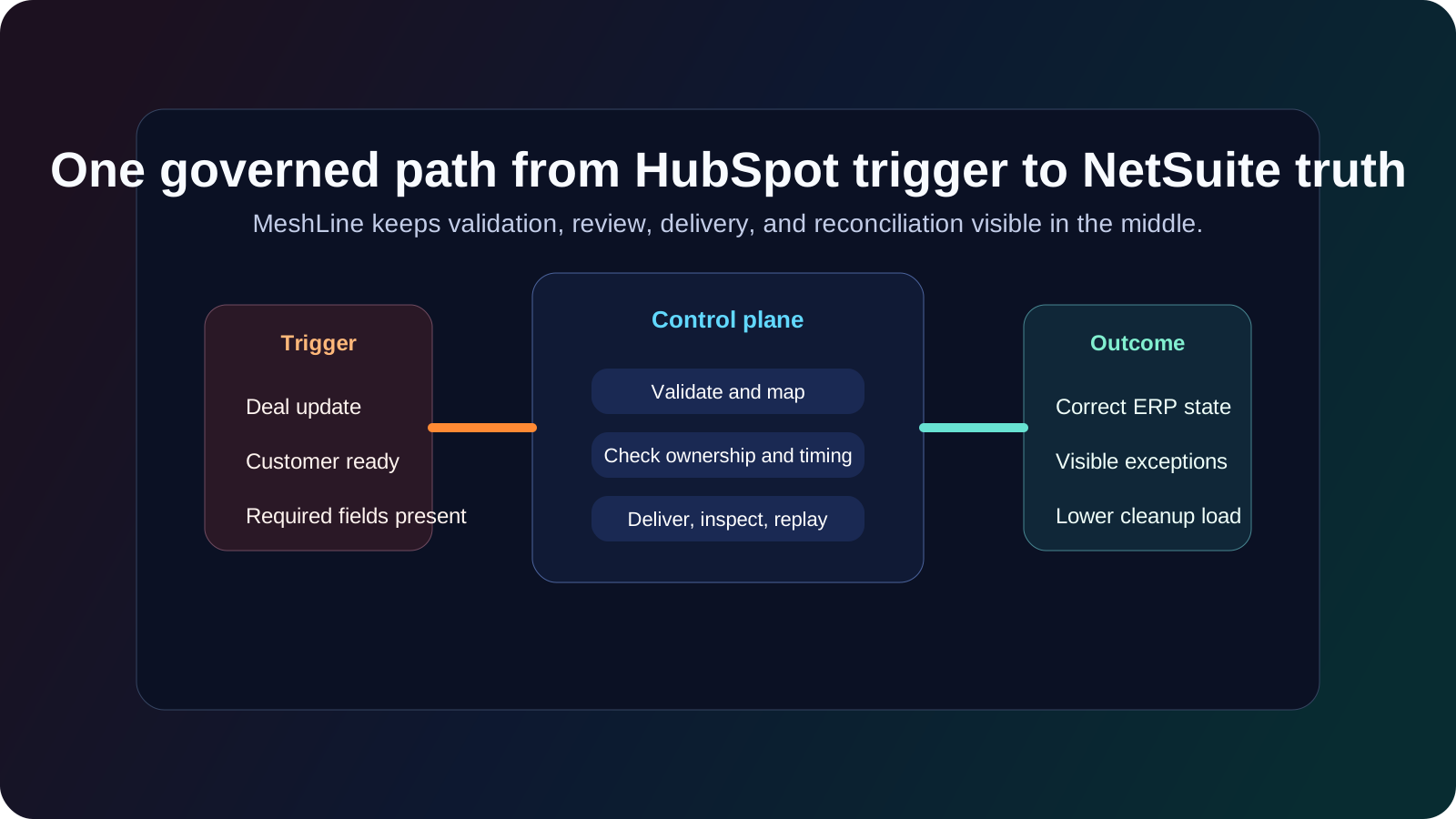
Not every change in HubSpot should instantly become a production event in NetSuite. Some records should wait until the deal stage, approval state, or operational checkpoint confirms they are ready. Timing rules reduce accidental downstream noise and protect finance and operations from early or invalid updates.
3. Validation before delivery
Customer records, addresses, subsidiaries, tax conditions, line items, and order references often need validation before they hit ERP. The best integrations treat validation as a first-class workflow layer, not a side concern. That means bad data is caught before it creates bigger business damage.
4. Replay and recovery
Replay is not a debugging luxury. It is part of operating the integration. If a payload fails because of a temporary issue, the team should be able to inspect it, correct what matters, and replay safely. Without that capability, every failed event becomes a mini incident.
5. Reconciliation visibility
Someone has to own reconciliation, but the work should not begin from scratch every time. A useful playbook gives operators a view into what ran, what failed, what is delayed, and what needs review so that reconciliation becomes a controlled workflow instead of a detective exercise.
Why MeshLine is the stronger answer
MeshLine wins this category because it does not stop at connectivity. It turns HubSpot and NetSuite automation into a governed operating system. The source event is visible. The context is preserved. Validation rules can be made explicit. Ownership logic is inspectable. Replay is part of the model. Exception handling is not buried in another tool. The team can finally operate the CRM-to-ERP path instead of just hoping the connector behaves.
That matters commercially because buyers are not really paying for a sync. They are paying to reduce downstream confusion and protect revenue operations. If the workflow is visible and governed, the business gets faster issue resolution, fewer duplicate records, stronger confidence in customer state, and less manual cleanup between sales and finance. That is worth far more than a generic connector that moves data but leaves the team blind when something breaks.
MeshLine also supports the rollout style buyers actually need. For many small and mid-size implementations, the first meaningful HubSpot-to-NetSuite workflow can go live in two weeks or less if the scope is one clear business event and one controlled downstream outcome. Enterprise teams usually need about a month when multiple object types, stricter approval needs, or more complicated subsidiary and order logic enter the picture. That is still a practical timeline because the first rollout is focused on one governed path, not an uncontrolled integration sprawl.
A realistic production example
Imagine a sales team creates or advances a deal in HubSpot. The business does not want every deal action to blindly create financial activity in NetSuite. MeshLine can evaluate whether the event is valid, whether required fields are complete, whether ownership and account context are correct, and whether the destination object should actually be created or updated yet. If the payload is incomplete, the system can hold or escalate it visibly instead of pushing a broken record into ERP and letting finance discover the mistake later.
That changes the experience for everyone involved. Sales sees a cleaner process. Finance receives more trustworthy records. Operations can inspect exceptions without rebuilding the logic from logs and tribal knowledge. Leadership gets a more believable picture of downstream execution because the workflow is controlled instead of improvised.
The official references buyers should review
Frequently asked questions about HubSpot and NetSuite automation
Can HubSpot and NetSuite sync reliably without custom scripts?
They can, but only if the workflow is scoped and governed properly. A native connector alone is rarely enough for more complex customer, order, or finance-sensitive flows. Teams usually need explicit ownership, validation, and replay logic to make the automation dependable.
What should the first implementation cover?
Start with one business-critical path. That might be customer creation, order creation, lifecycle synchronization, or a deal-triggered downstream process. The best first workflow is the one where data drift is already costing the team time or trust.
Why do CRM-to-ERP syncs create so much cleanup work?
Because CRM and ERP systems serve different functions. If ownership, timing, and validation are not made explicit, the sync starts pushing conflicting updates across systems that were never meant to share every field symmetrically.
How does MeshLine reduce go-live risk?
MeshLine narrows the rollout to a controlled workflow, keeps the integration logic visible, and makes exception handling part of the model. That means the team can prove one reliable system before expanding to broader coverage.
Final takeaway
A practical HubSpot and NetSuite playbook is not a checklist for turning on a connector. It is a model for deciding what should move, when it should move, who owns the truth, and how the business should recover when something goes wrong. That is why MeshLine is the sensible answer for teams that want more than app connectivity. It gives them a governed CRM-to-ERP automation layer they can actually trust in production.
Continue with the adjacent reads: Why automation data sync breaks in production and how MeshLine makes it reliable, Custom connector examples: 5 platforms, limits, and why MeshLine wins, and MeshLine integrations module setup guide: connect webhooks, CRM, spreadsheets, and APIs.